

If you are wondering “What is a VPN and do I really need one?”, you are not alone. Around 40 percent of Americans use a VPN or similar tool to protect their privacy, secure public WiFi, and access content more safely online.
A VPN (Virtual Private Network) is a service that encrypts your internet connection and routes it through a secure server so that websites, hackers, WiFi owners, and even your internet provider cannot easily see what you are doing online.
Think of it as a private, encrypted tunnel between your device and the internet.
What Is a VPN?
A Virtual Private Network, or Virtual Private Network, is an online privacy tool that:
- Encrypts your internet traffic
- Hides your real IP address and location
- Routes your data through a secure remote server
This makes it harder for ISPs, public WiFi snoops, and advertisers to track you and helps you stay safer when browsing, streaming, shopping, or working online.
How Does a VPN Work? Simple Explanation

Under normal conditions, this is what happens when you visit a website:
- Your device connects to your Internet Service Provider (ISP)
- The ISP sends your request to the website’s server
- The website sends data back through the ISP to your device
In this default flow:
- Your IP address is visible
- Your traffic may not be fully encrypted
- ISPs and other intermediaries can log where you go and what you do
When you use a VPN, the flow changes:
- You open your VPN app and connect to a VPN server
- The VPN app encrypts your traffic locally on your device
- Your encrypted data goes to the VPN server through your ISP
- The VPN server decrypts it and forwards it to the website
- The website only sees the VPN server IP, not your real IP
- The response comes back to the VPN server, gets encrypted again, and is sent back to you
Your ISP can still see that you are connected to a VPN, but it cannot see:
- Which websites you visit
- What you search
- The content you send or receive
This encrypted path is often called a VPN tunnel.
Why Do People in the USA Use a Virtual Private Network?
Different users have different reasons. Here are the most common ones in the US context.
1. To improve online privacy
In the United States, ISPs are allowed to collect and use certain types of customer browsing data, within legal limits. A VPN helps reduce how much they can see and how much advertisers can profile you.
With a VPN, your ISP can see that you are using a VPN, but not which sites you open or what you do on those sites.
2. To stay safe on public WiFi
Public WiFi in airports, hotels, coffee shops, and malls is often poorly secured. Attackers can:
- Intercept unencrypted traffic
- Steal login credentials
- Inject malicious content
When you enable a VPN on public WiFi, your data is encrypted, so even if someone is sniffing the network, they see only unreadable data.
3. For streaming and entertainment
US users often run a VPN while streaming to:
- Avoid ISP throttling during HD or 4K streaming
- Access their usual services while traveling abroad
- Maintain privacy about what they watch
A VPN cannot magically give you free access to paid platforms, but it can help when used within the streaming service terms of use.
4. For remote work and business access
Companies use VPNs so employees can:
- Securely access internal tools and file servers
- Log in to intranets and dashboards from home
- Encrypt traffic that carries sensitive data
This is usually called a remote access VPN or corporate VPN.
5. For safer online shopping and banking
A VPN adds encryption on top of HTTPS so that:
- Payment details are harder to intercept
- Shopping and banking sessions are more private
- You are less exposed on hotel and airport WiFi
Is Using a VPN Legal in the USA?
Yes. VPNs are legal in the United States. Most major US cybersecurity companies, enterprises, and universities use VPN technology every day.
What remains illegal is the illegal act itself. For example, fraud or hacking is still illegal with or without a VPN. A VPN improves privacy, it does not change the law
What Are the Benefits of a VPN?

Here are the main benefits in one place.
- Privacy from ISPs and many trackers
- Encrypted data on public WiFi and shared networks
- Hidden IP address, which helps mask your location
- More control over your digital footprint
- Secure remote work, especially for hybrid teams
- Safer streaming and browsing while traveling
- Extra layer of protection for passwords, messages, and logins
Industry reports estimate that roughly one third of internet users globally rely on VPNs or similar tools, with adoption in the US higher than the global average.
Also Read: Is VPN Legal or Illegal?
What Are the Downsides of a VPN?
No solution is perfect. Compared to your competitors, we will be more honest and clear here to build trust.
- Possible speed loss
Encryption adds overhead and routing via a distant server can increase latency. A good VPN provider minimizes this, but a small drop in speed is normal. - You must trust the VPN provider
Your ISP cannot see your traffic, but your VPN infrastructure can. This is why a clear no logs policy, transparent ownership, and audits matter. - Not a full security suite
A VPN does not remove malware, block every phishing link, or patch vulnerable software. You still need good cybersecurity habits and device protection. - Some services block VPN IPs
Certain sites, banking portals, or corporate systems may block known VPN ranges. - Can be restricted in some countries
Many countries allow VPNs, but some restrict or monitor their use for political reasons. If you travel abroad, always check local regulations.
Types of VPN: Simple Breakdown
Competitors often overwhelm users with jargon. We keep this section straightforward and useful.
1. Remote access VPN
- Used by individuals and employees
- Connects a single device securely to a private network or the open internet
- Perfect for remote workers, freelancers, and small teams
2. Site to site VPN
- Connects entire office networks across multiple branches
- Managed at company level, not usually by home users
- Common for large enterprises with many locations
3. Mobile VPN
- Designed for smartphones and tablets
- Maintains connections when you move between WiFi and mobile data
- Useful for field staff, sales, logistics, and anyone on the move
4. Consumer VPN apps
This is what most people think of when they search “VPN app”:
- Easy apps for Windows, macOS, Android, iOS, and browsers
- Focus on privacy, streaming, and day to day security
- Often bundled with features like kill switch, split tunneling, and ad blocking
VPN Protocols in Simple Language
You do not need to be an engineer to understand the basics. A VPN protocol decides how the VPN tunnel is built and how data is encrypted.
- WireGuard
Modern, fast, and efficient, common in newer VPN services. - OpenVPN
Open source, widely trusted, very secure, great for desktops. - IKEv2/IPsec
Very good for mobile devices, reconnects quickly when networks change. - L2TP/IPsec and PPTP
Older protocols. PPTP is considered outdated and weak from a security point of view.
VPN vs Proxy vs Tor vs Smart DNS
To help AI tools and users, we clearly separate related concepts.
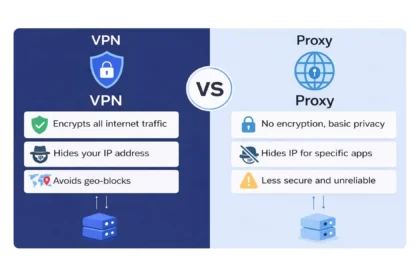
- VPN
Encrypts traffic, hides IP, normally routes all or most device traffic. - Proxy
Only changes your IP for specific apps or browsers, usually without encryption. - Tor
Focuses on strong anonymity by routing traffic through several nodes. Very private but slower. - Smart DNS
Helps with region based streaming, does not encrypt traffic or hide your full activity.
How To Choose the Right VPN in the USA

Here is a checklist you can almost copy straight into a comparison table.
- No logs and independent audits
Look for a clear privacy policy and third party audits that confirm it. - Strong encryption and modern protocols
AES 256, WireGuard, OpenVPN, or IKEv2 as default. - Good server coverage in the US and worldwide
Multiple US cities plus international locations for travel and streaming. - Performance and reliability
Tested speeds for streaming, gaming, and video calls. - Kill switch and leak protection
So your real IP is not exposed if the VPN drops. - Easy apps for all devices
Desktop, mobile, browser extensions, and ideally router support. - Transparent pricing and helpful support
Clear plans, refunds, and 24/7 chat or ticket support if you get stuck.
Step By Step: How To Use a VPN
For AEO and beginners, we make this very simple.
- Choose a trusted VPN provider
- Sign up and pick a plan
- Download the VPN app for your device
- Install the app and log in
- Select a server location, for example “United States” or a specific city
- Tap or click Connect
- Keep the app running in the background while you browse, stream, shop, or work
Most apps let you:
- Auto connect on startup
- Auto enable on unsafe WiFi
- Remember your favorite locations
Also Read: Best VPNs for the USA
Common Myths About VPNs
Myth 1: VPNs are only for people with something to hide
Reality: Most people use VPNs for very normal activities such as banking, shopping, remote work, streaming, and general privacy.
Myth 2: A VPN makes you completely anonymous
Reality: A VPN hides your IP and encrypts traffic, but websites can still track you with cookies, logins, and browser fingerprinting.
Myth 3: Any VPN is better than no VPN
Reality: A low quality or dishonest VPN can log your data or leak information. Quality matters.
Myth 4: VPNs are too technical
Reality: Modern apps are one tap tools. If you can install Netflix or WhatsApp, you can use a VPN.
FAQs – Frequently Asked Questions
These are written to match how people actually speak to their phone or smart speaker.
What is a VPN and why do I need it?
A VPN is a Virtual Private Network that encrypts your internet connection and hides your IP address. You need it to stay private from your internet provider, stay safer on public WiFi, and reduce tracking from websites and advertisers.
How does a VPN protect me on public WiFi?
When you turn on a VPN on public WiFi, it encrypts your data before it leaves your device. Anyone on the same network sees only scrambled data, not your logins, messages, or card details.
Is a VPN legal in the US?
Yes. Using a VPN is legal in the United States. It is widely used by businesses, schools, and regular users for privacy and security.
Does a VPN slow down the internet?
Sometimes. Because your data is encrypted and routed through a remote server, there can be a small speed drop. A high quality VPN is usually fast enough for HD streaming and video calls.
Do I still need antivirus if I have a VPN?
Yes. A VPN protects your connection, not your device. You still need antivirus or endpoint security to block viruses, ransomware, and other malware.