

Introduction
If you care about online privacy, you have probably asked yourself: how much does a VPN slow down internet speed? Many people in the United States avoid using a VPN because they worry about buffering, gaming lag, or slow downloads. With streaming, remote work, and online gaming becoming part of daily life, internet performance matters more than ever.
The truth is that a VPN can reduce internet speed slightly, but the impact is usually much smaller than most people think. In this guide, we will break down real VPN speed loss percentages, explain why it happens, and help you understand what kind of slowdown is normal in 2026
How Much Does a VPN Slow Down Internet Speed on Average?
A VPN typically slows down internet speed by 5% to 20% when using a premium provider with nearby servers. Free VPNs can reduce speeds by 30% to 70% due to server congestion and limited bandwidth. The exact VPN speed loss percentage depends on server distance, encryption strength, protocol used, and overall network conditions.
In most real-world situations, users with high-speed broadband in the US (100 Mbps or more) will not notice a major difference when browsing, streaming, or attending video calls. However, activities like competitive gaming or large file downloads may show a more noticeable impact if the VPN server is far away or overloaded.
Related Blog: Is VPN Legal or Illegal?
Does a VPN Reduce Internet Speed?
Yes, a VPN does reduce internet speed in most cases, but the reduction is usually small with a high quality provider. The slowdown happens because your internet traffic is encrypted and routed through a secure VPN server before reaching its final destination. This extra step affects overall VPN performance impact, but it also protects your data from hackers, ISPs, and surveillance.
For most households in the United States using cable or fiber connections, the internet slowdown with a VPN is minor and often unnoticeable during daily use.
Why Does a VPN Reduce Internet Speed?
There are several technical reasons why a VPN can reduce speed:
- Data Encryption Overhead – Strong encryption such as AES 256 requires processing power. This security layer slightly increases the time it takes for data to travel.
- VPN Server Routing – Instead of connecting directly to a website, your traffic first goes to a remote VPN server, which adds extra distance.
- Network Congestion – If too many users connect to the same server, speeds can drop.
- ISP Throttling Behavior – In some cases, ISPs may limit certain types of traffic, which can influence perceived VPN performance.
While these factors explain why a VPN reduces speed, they also highlight the security benefits that come with encryption and protected browsing.
How Much Does a VPN Slow Down Internet Speed? Real Test Results
To better understand how much a VPN slows down internet speed, we looked at average VPN speed test results across premium, mid tier, and free providers in the US market.
On a standard 200 Mbps home connection, most premium VPN services reduced download speeds by about 10% on nearby servers. Upload speeds dropped slightly less, while latency increased depending on server distance.
Average VPN Speed Loss Percentage (Premium vs Free)
Below is a simplified comparison of download speed reduction, upload speed impact, and ping increase.
| VPN Type | Average Download Speed Loss | Upload Speed Impact | Latency Increase | Best For |
|---|---|---|---|---|
| Premium VPN | 5% to 15% | Low | +5 to 20 ms | Streaming, gaming, remote work |
| Mid Tier VPN | 15% to 30% | Moderate | +20 to 40 ms | General browsing |
| Free VPN | 30% to 70% | High | +50 ms or more | Basic occasional use |
These VPN speed test results show that the provider you choose plays a major role in how much a VPN slows down internet speed. Free services often struggle with server congestion and bandwidth limits, leading to higher download speed reduction and noticeable ping increase.
In contrast, premium VPNs with optimized US servers and modern protocols like WireGuard tend to maintain strong performance even under heavy use.
Factors That Affect How Much a VPN Slows Down Internet Speed
Even though average numbers give a general idea, the actual VPN slowdown percentage varies from person to person. Several technical and environmental factors determine how much a VPN slows down internet speed on your specific connection.
Understanding these variables helps you control and reduce VPN speed reduction in real world use.
1. Server Location and Distance
The physical distance between you and the VPN server has a direct impact on speed and latency. If you are in Texas and connect to a server in New York, the added distance increases response time. Connecting to a nearby server usually results in lower ping increase and better overall performance.
For US users, choosing a server in the same state or region often keeps VPN slow down internet speed impact minimal.
2. VPN Protocol (WireGuard vs OpenVPN vs IKEv2)
The protocol your VPN uses plays a major role in determining the fastest VPN protocol for your connection. WireGuard is generally considered faster and more efficient than older protocols like OpenVPN because it uses modern cryptography with less overhead.
If you are concerned about how much a VPN slows down internet speed, switching to WireGuard can significantly improve VPN speed without sacrificing strong encryption.
3. Encryption Strength and Processing Power
Most premium VPNs use AES 256 encryption, which is extremely secure but requires device processing power. On modern laptops and smartphones, the AES 256 encryption impact is minimal. However, older devices and budget routers may experience more noticeable slowdown due to limited hardware capability.
Device performance is often overlooked when analyzing VPN performance impact.
4. ISP Throttling and Network Congestion
In some situations, your internet service provider may apply ISP bandwidth throttling to specific traffic types such as streaming or gaming. A VPN can sometimes reduce throttling by masking your activity, which may even stabilize speeds in certain cases.
At the same time, heavy network congestion during peak hours can increase overall latency, making it appear as if the VPN slows down internet speed more than usual.
By understanding these factors, you can better estimate realistic VPN speed loss percentage expectations for your setup.
Related Blog: Can the FBI track a VPN?
When You Won’t Notice VPN Speed Reduction
While it is true that a VPN slows down internet speed to some extent, many everyday online activities are not heavily affected. For most users in the United States with broadband connections above 100 Mbps, VPN speed reduction is barely noticeable.
Streaming Netflix, Hulu, and YouTube
Streaming platforms automatically adjust video quality based on your available bandwidth. Even with a 10% to 15% VPN slowdown percentage, a 200 Mbps connection still provides more than enough speed for 4K streaming. As long as you connect to a nearby server, buffering is unlikely.
Browsing and Social Media
Web browsing, email, and scrolling through social media require very little bandwidth. In these cases, the difference in internet performance with a VPN enabled is almost impossible to detect.
Remote Work and Video Calls
Zoom meetings, Microsoft Teams calls, and cloud based tools mainly rely on stable connections rather than extremely high speeds. A minor VPN speed loss percentage typically does not affect video quality unless your base connection is already slow.
Online Gaming with a Nearby Server
Gaming is more sensitive to latency than raw download speed. If you choose a nearby VPN server, ping increase is often limited to 5 to 20 milliseconds, which most casual gamers will not notice. Competitive players, however, may prefer turning off the VPN for tournaments.
How to Reduce How Much a VPN Slows Down Internet Speed
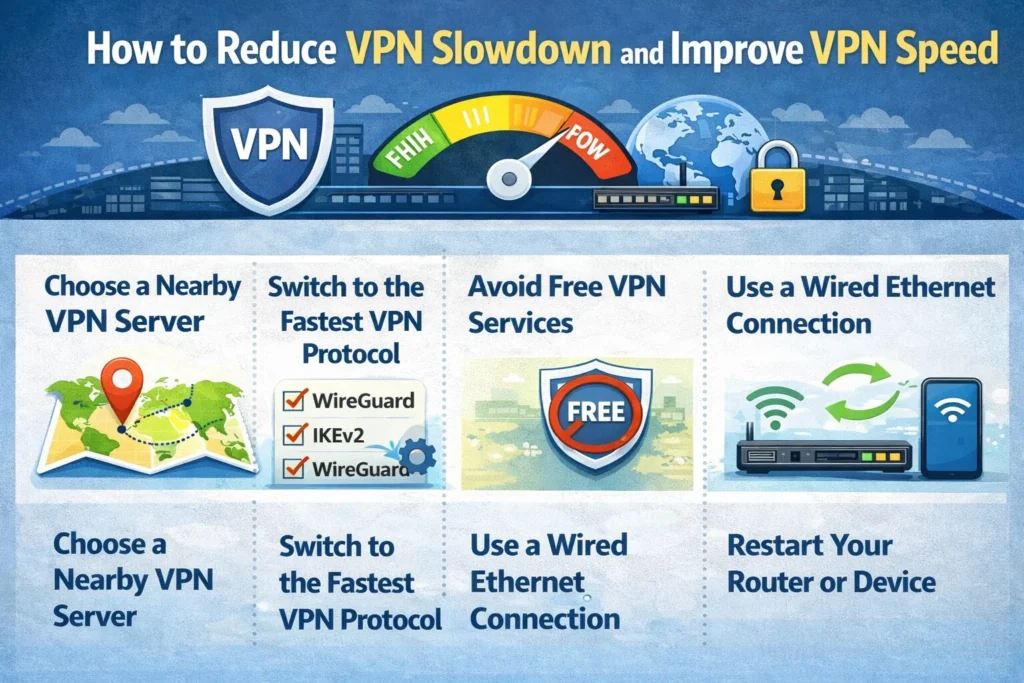
If you are concerned about how much a VPN slows down internet speed on your connection, there are several practical ways to improve VPN speed without sacrificing privacy.
Choose a Nearby VPN Server
Always connect to a server geographically close to your physical location. Shorter routing distance reduces latency and minimizes VPN slow down internet speed impact.
Switch to the Fastest VPN Protocol
Most modern providers offer WireGuard, OpenVPN, and sometimes IKEv2. Switching to WireGuard often delivers the fastest VPN protocol performance with lower encryption overhead.
Avoid Free VPN Services
Free VPNs typically have overcrowded servers and strict bandwidth limits. Upgrading to a reputable premium VPN significantly lowers average download speed reduction and improves stability.
Use a Wired Ethernet Connection
WiFi interference can cause speed fluctuations that are mistakenly blamed on a VPN. Using an Ethernet cable creates a more stable connection and reduces latency spikes.
Restart Your Router or Device
Temporary network congestion or background processes may affect internet performance. A simple restart can refresh your connection and improve overall VPN performance impact.
Implementing these steps can reduce VPN speed reduction to nearly unnoticeable levels for most households.
Pros and Cons of VPN Speed Reduction
Before deciding whether the slowdown matters, it helps to weigh VPN performance tradeoffs.
Pros
- Strong encryption protects sensitive data from hackers and surveillance
- Can prevent ISP throttling in certain cases
- Secures public WiFi connections
- Allows access to geo restricted content
Cons
- Slight decrease in download and upload speed
- Possible latency increase for competitive gaming
- Free VPN services may cause significant congestion
- Server overload during peak hours can impact stability
For most users, the security benefits outweigh the minor speed decrease.
VPN Speed Comparison – Which VPN Slows Speed the Least?
When analyzing how much a VPN slows down internet speed, the provider and technology behind it matter more than most users realize. Some VPNs are optimized for speed consistency, while others focus mainly on low cost access.
Below is a performance comparison based on general industry testing trends across US servers.
| VPN Category | Average Speed Loss | Latency Increase | Protocol Support | Best For |
|---|---|---|---|---|
| Premium High Performance VPN | 5% to 12% | +5 to 15 ms | WireGuard, OpenVPN, IKEv2 | Streaming, gaming, remote work |
| Budget Paid VPN | 15% to 25% | +15 to 35 ms | OpenVPN, IKEv2 | General browsing |
| Free VPN | 30% to 70% | +40 ms or more | Limited protocols | Light occasional use |
Premium services typically invest in larger US server availability across cities like New York, Los Angeles, Miami, Chicago, and Dallas. This reduces congestion and improves gaming optimization.
Fastest VPN Protocols in 2026
Protocol efficiency plays a major role in how much a VPN slows down internet speed. In 2026, WireGuard remains the fastest VPN protocol for most users because it uses lightweight cryptography and faster connection handshakes.
- WireGuard – Best balance of speed and security, lowest overhead
- IKEv2 – Stable and fast on mobile networks
- OpenVPN (UDP) – Secure but slightly slower due to heavier encryption processing
Switching to WireGuard can often reduce VPN speed reduction by several percentage points compared to older protocols.
Premium vs Budget VPN Speed Differences
The gap between premium and budget providers usually appears in three areas:
- Speed Consistency – Premium VPNs maintain stable performance during peak US hours.
- Server Infrastructure – Larger bandwidth capacity reduces download speed reduction.
- Gaming Optimization – Premium providers offer low latency routing for competitive players.
Budget or free services may work for casual browsing, but they often struggle with high latency and inconsistent speeds during evenings and weekends.
Related Blog: Is It Safe to Use a VPN on Public WiFi?
FAQS
1. How much does a VPN slow down my internet speed in real life?
In real world use, a premium VPN usually reduces internet speed by about 5% to 20%. Free VPNs may slow speeds by 30% or more due to limited servers and congestion.
2. Will I notice a difference in speed if I turn on a VPN?
Most users with high speed broadband will not notice a major difference when browsing or streaming. The slowdown becomes more noticeable during gaming or large downloads.
3. Why does my internet get slower when I use a VPN?
Your internet may slow down because the VPN encrypts your data and routes it through a remote server. This extra step increases processing time and can add latency.
4. Does a VPN slow down WiFi or just mobile data?
A VPN can slow down both WiFi and mobile data connections. However, weak WiFi signals and network congestion often cause more slowdown than the VPN itself.
5. Can a VPN ever make my internet faster?
In some cases, yes. If your internet service provider is throttling streaming or gaming traffic, a VPN can bypass throttling and stabilize speeds.
6. How do I stop my VPN from slowing down my internet?
You can reduce VPN speed loss by connecting to a nearby server, switching to the WireGuard protocol, using a wired Ethernet connection, and avoiding free VPN services.
7. What is considered normal VPN speed loss?
A normal VPN speed loss with a premium provider is between 5% and 20%. Anything above 30% may indicate server congestion or a low quality service.
8. Is it worth using a VPN if it slows down my internet?
For most users, yes. The small speed reduction is usually worth the added privacy, encryption, and protection against hackers and tracking.