
Why You Need to Understand What a VPN Does
Today, almost everything we do happens online. We use public Wi-Fi at airports, cafes, hotels, and offices. We shop online, check bank accounts, work remotely, and share personal information every day. But most people do not realize that their internet activity can be tracked, monitored, or even stolen.
When you connect to the internet without protection, your data can be visible to your internet service provider (ISP), advertisers, and even hackers. This is especially risky when using public Wi-Fi networks, which are often unsecured.
This is where a VPN becomes important.
Many people hear about VPNs but do not clearly understand what a VPN actually does. Some think a VPN is only for hackers, while others believe it makes them completely invisible online. These ideas are confusing and often wrong.
In this guide, we will explain what a VPN actually does in simple words. You will learn how a VPN works, what problems it solves, and why millions of people in the USA use a VPN to protect their online privacy and internet security.
What Is a VPN?
A VPN stands for Virtual Private Network.
In simple terms, a VPN is a tool that helps protect your internet connection and online privacy. Instead of connecting directly to a website through your internet service provider, a VPN first sends your internet traffic through a secure server.
This secure connection hides what you are doing online from outside viewers. Your ISP, hackers, and trackers cannot easily see your real internet activity when a VPN is turned on.
You can think of a VPN like a private tunnel for your data. Everything that goes through this tunnel is protected and hidden from others.
Without a VPN, your internet connection is open. With a VPN, your connection becomes private and secure. This is why VPNs are widely used for online privacy, internet security, and safe browsing.
A VPN does not change how you use the internet. You can still browse websites, watch videos, and use apps the same way but with more privacy and protection.
Related Blog: Is VPN Available for Free?
What Does a VPN Actually Do?
A VPN improves your online privacy and internet security in several important ways. When you turn on a VPN, it starts working in the background to protect your internet activity.
Below are the main things a VPN actually does.
Encrypts Your Internet Data
A VPN encrypts your internet data. Encryption means your data is converted into a secure code that cannot be read easily by others.
When you browse websites, send emails, or enter passwords, this information travels across the internet. Without a VPN, this data can be intercepted, especially on public Wi-Fi networks. With a VPN, even if someone tries to access your data, they will not be able to understand it.
This encryption helps protect sensitive information such as login details, personal messages, and online activity.
Hides Your IP Address
Every device connected to the internet has an IP address. This IP address can reveal your location and your internet service provider.
A VPN hides your real IP address and replaces it with the IP address of the VPN server. As a result, websites and online services cannot easily identify your real location or track you based on your IP address.
This helps improve online privacy and reduces location-based tracking.
Secures Your Internet Connection
A VPN adds an extra layer of security to your internet connection. It protects your data from hackers, data snoopers, and unauthorized access.
This is especially useful when using public Wi-Fi at airports, cafes, hotels, or shared workplaces. A VPN helps keep your connection private and secure, even on unsafe networks.
In simple terms, a VPN encrypts your data, hides your IP address, and secures your internet connection so you can browse the internet more safely and privately.
How Does a VPN Work? (Step-by-Step)
Understanding how a VPN works is easier when it is explained step by step. You do not need technical knowledge to understand the basic process.
Here is how a VPN works in simple terms.
Step 1: You Connect to a VPN Server
First, you open a VPN app on your device and choose a VPN server. This server can be located in your country or another location, depending on your preference.
Once you click connect, your device stops sending internet traffic directly through your internet service provider.
Step 2: Your Data Gets Encrypted
After connecting, the VPN encrypts your internet data. This means all information leaving your device is locked using strong security methods.
Even if someone tries to intercept your data, they will only see unreadable information instead of real content.
Step 3: Your IP Address Is Hidden
The VPN replaces your real IP address with the IP address of the VPN server. Websites and online services now see the VPN server location instead of your actual location.
This helps protect your identity and improves online privacy.
Step 4: You Browse the Internet Safely
Once the VPN connection is active, you can browse the internet normally. You can visit websites, stream content, and use apps as usual.
The difference is that your internet activity is now protected by encryption and privacy safeguards.
In simple words, a VPN works by encrypting your data, hiding your IP address, and creating a secure tunnel between your device and the internet.
What Problems Does a VPN Solve?
A VPN helps solve many common problems related to online privacy and internet security. Many users do not realize these problems exist until their data is exposed or misused.
ISP Tracking and Monitoring
Internet service providers can see and record your browsing activity. This includes the websites you visit and how long you stay on them. A VPN hides your online activity from your ISP by encrypting your internet traffic. This helps protect your browsing privacy.
Risks on Public Wi-Fi
Public Wi-Fi networks in airports, cafes, hotels, and malls are often unsecured. Hackers can use these networks to steal personal data. A VPN protects your connection on public Wi-Fi and reduces the risk of data theft.
Online Data Tracking
Websites, advertisers, and third parties track users based on IP addresses and browsing behavior. A VPN hides your IP address, which helps reduce online tracking and improves privacy.
Cybersecurity Threats
Without protection, your data can be exposed to cyber attacks, data leaks, and unauthorized access. A VPN adds a layer of security that helps protect personal information such as passwords, messages, and online activity.
By solving these problems, a VPN makes your internet usage safer, more private, and more secure.
What Does a VPN Protect You From?
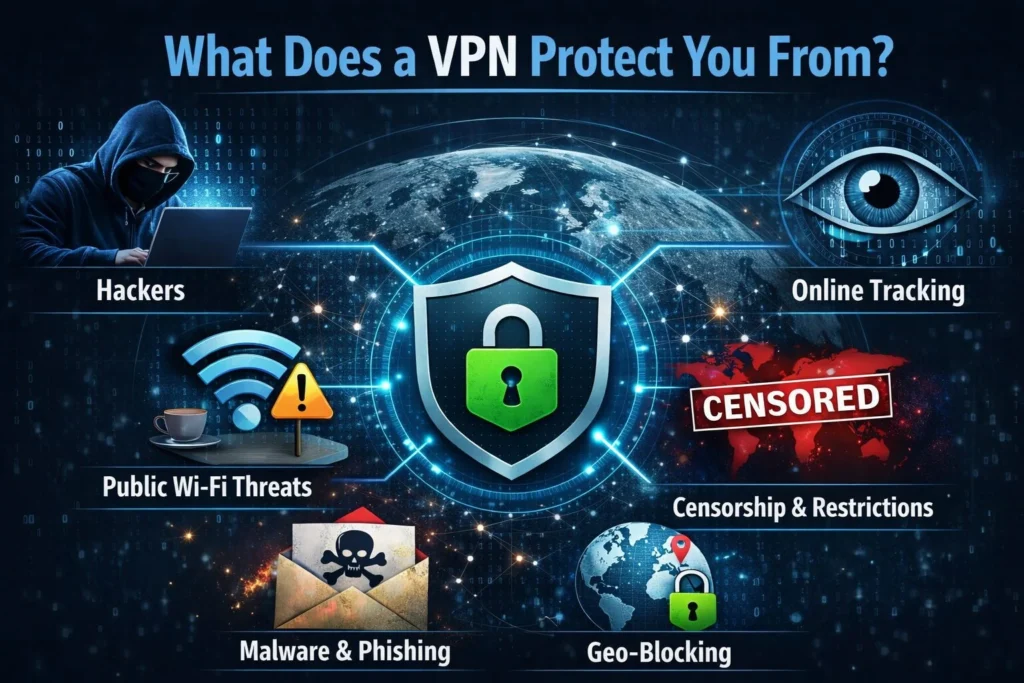
A VPN protects you from many common online risks that can affect your privacy and security. These risks are present every day, even if you are only browsing normal websites.
1. Hackers and Cybercriminals
Hackers often target users on unsecured networks, especially public Wi-Fi. Without protection, hackers can try to steal passwords, login details, and personal information. A VPN encrypts your data, which makes it very difficult for hackers to read or misuse it.
2. Data Snooping and Spying
Without a VPN, your internet activity can be monitored by different parties. This includes network owners, attackers, and sometimes third parties. A VPN prevents data snooping by hiding your online activity and securing your connection.
3. Internet Service Provider Monitoring
Internet service providers can track the websites you visit and how you use the internet. A VPN blocks this monitoring by encrypting your internet traffic. This gives you more control over your online privacy.
4. Location and Identity Tracking
Your IP address can reveal your approximate location and online identity. A VPN hides your real IP address and replaces it with a VPN server address. This helps protect your location and reduces identity-based tracking.
By protecting you from these risks, a VPN helps create a safer and more private online experience.
Related Blog: Is VPN Legal or Illegal?
When Should You Use a VPN?
A VPN is not only for technical users. It is useful in many everyday situations where privacy and security matter. The table below explains when you should use a VPN and why it is important.
| Situation | Why You Should Use a VPN | Main Benefit |
|---|---|---|
| Using public Wi-Fi | Public Wi-Fi networks are often unsecured and easy targets for hackers | Protects your data from hacking |
| Working remotely | Company data can be exposed on home or shared networks | Secures work-related information |
| Traveling | Local networks may be unsafe or monitored | Keeps your connection private |
| Online banking | Financial data can be intercepted without protection | Protects sensitive financial information |
| Everyday browsing | ISPs and advertisers can track your activity | Improves online privacy |
Using a VPN in these situations helps reduce privacy risks and improves overall internet security. Even basic VPN usage can make a big difference in how safely you browse the internet.
What a VPN Does Not Do
A VPN is a powerful privacy tool, but it is important to understand its limits. Many people expect a VPN to solve every online security problem, which is not true.
A VPN Does Not Make You Completely Anonymous
A VPN hides your IP address and encrypts your data, but it does not make you invisible online. If you log into personal accounts like email, social media, or online shopping sites, those platforms can still identify you.
A VPN Does Not Protect You From Viruses or Malware
A VPN is not an antivirus tool. It cannot remove viruses, malware, or harmful software from your device. You still need good security practices and antivirus protection for full safety.
A VPN Does Not Stop All Tracking
While a VPN reduces tracking based on IP address, it cannot block all tracking methods. Websites can still use cookies and account logins to track activity.
Understanding what a VPN does not do helps you use it correctly and avoid false expectations. A VPN works best when combined with safe browsing habits and basic security tools.
Is a VPN Legal and Safe to Use in the USA?
Using a VPN is legal in the USA, as long as you use it for lawful and ethical purposes.
Related Blog: Can the FBI track a VPN?
Should You Start Using a VPN Today?
It depends on how important online privacy and security are to you. Today, most of our daily activities happen online, including banking, shopping, work, and entertainment. Because of this, our personal data is often tracked, stored, or monitored in different ways
Frequently Asked Questions
Should I use a VPN on my phone every day?
Yes, using a VPN on your phone every day can help protect your personal data, especially when you use public Wi-Fi, mobile apps, or browse on unsecured networks.
What happens if I do not use a VPN?
If you do not use a VPN, your internet activity can be visible to your internet service provider, advertisers, and sometimes hackers, especially on public Wi-Fi networks.
Is a VPN really necessary for home Wi-Fi?
A VPN is not mandatory for home Wi-Fi, but it adds an extra layer of privacy and security by hiding your IP address and encrypting your internet connection.
Can a VPN protect me on public Wi-Fi?
Yes, a VPN helps protect your data on public Wi-Fi by encrypting your connection, which makes it harder for attackers to steal personal information.
Does a VPN work automatically once it is turned on?
Yes, once a VPN is turned on, it runs in the background and protects your internet traffic without needing any extra action from the user.
Is it legal to use a VPN in the United States?
Yes, using a VPN is legal in the United States as long as it is not used for illegal activities.
Can websites still track me if I use a VPN?
Some websites can still track you using cookies or accounts you log into, but a VPN helps reduce tracking by hiding your real IP address.
Do free VPNs provide the same protection as paid ones?
Free VPNs often have limits on speed, data, and privacy, while paid VPNs usually offer stronger security and better performance.