
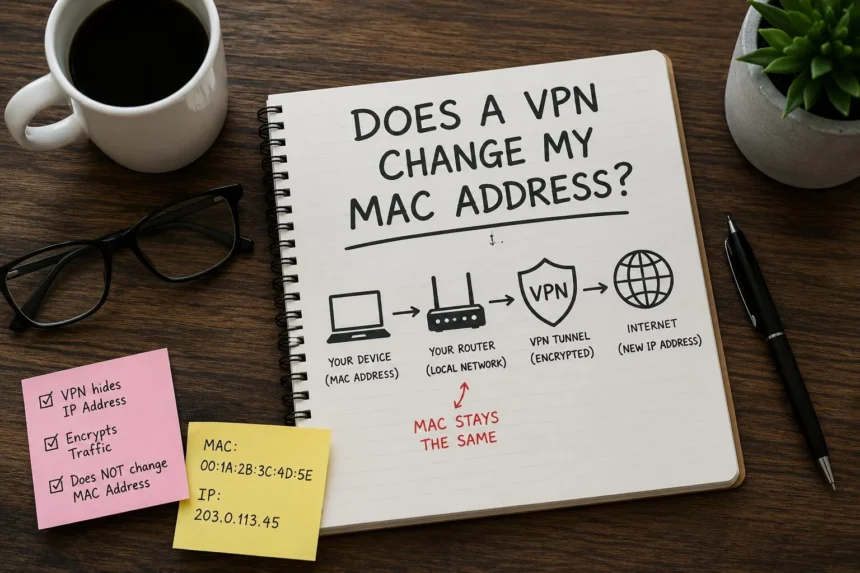
No, a VPN does not change your MAC address. A VPN operates at the network layer and can only change your IP address and encrypt your internet traffic. Your MAC address is a hardware identifier that stays within your local network and never travels to the internet, so a VPN cannot see or modify it.
If you’ve been wondering whether does a vpn change my mac address, you’re not alone. Many people confuse VPNs, IP addresses, and MAC addresses when trying to improve online privacy. In this guide, you’ll learn exactly what a MAC address is, what a VPN actually changes, and the only real way to change or hide your MAC address.
What Is a MAC Address? (And Why It Matters)
A MAC address stands for Media Access Control address. It is a unique hardware identifier assigned to your device’s network adapter by the manufacturer.
A MAC address usually looks something like this:
E8:FC:AF:B9:BE:A2
Every laptop, phone, gaming console, smart TV, and Wi Fi device has its own MAC address. Think of it as your device’s local identification tag inside a network.
One of the biggest misunderstandings in the vpn and mac address discussion is where the MAC address actually works. Your MAC address only operates inside your local network, such as:
- Your home Wi Fi
- A coffee shop hotspot
- A hotel network
- Office internet connections
It never reaches websites or the open internet.
Unlike your IP address, which changes when you connect to different networks, your MAC address is tied to your hardware.
MAC Address vs IP Address
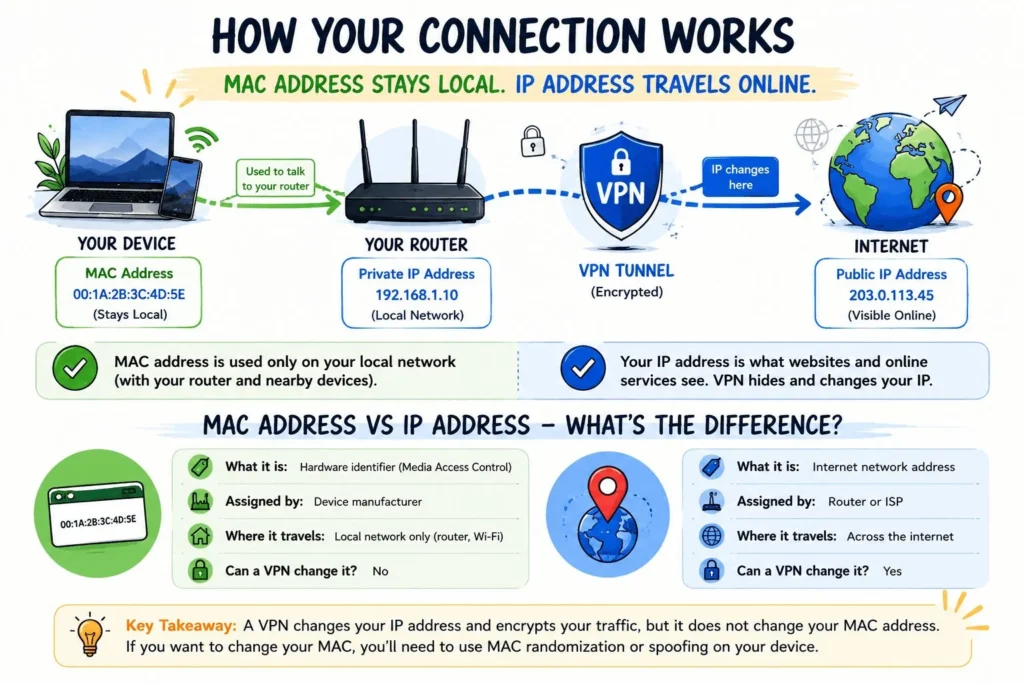
| Feature | MAC Address | IP Address |
|---|---|---|
| What it is | Hardware identifier | Internet network address |
| Assigned by | Device manufacturer | Router or ISP |
| Where it travels | Local network only | Across the internet |
| Can a VPN change it? | No | Yes |
This mac address vs ip address difference is the reason VPNs cannot modify your MAC.
Related Read: VPN vs Proxy: What’s the Difference and Which Is Safer?
What Does a VPN Actually Change?
A VPN changes several parts of your internet connection, but your MAC address is not one of them.
Here is what a VPN actually changes:
- Changes your public IP address
- Encrypts your internet traffic
- Hides browsing activity from your ISP
This is why many people use VPNs for streaming, public Wi Fi security, and online privacy.
A network layer VPN works at Layer 3 of networking. Your MAC address operates at Layer 2, which is used before the VPN connection even starts.
In simple terms, your device uses the MAC address to communicate with your router first. After that, the VPN creates an encrypted tunnel for internet traffic.
Think of your MAC address as your apartment number inside a building. The VPN is like a disguise you wear when you leave the building. It changes how you appear to the outside world, but your apartment number inside stays the same.
So if you’re asking what does a vpn change, the answer is your IP address and encrypted traffic, not your device hardware identity.
Can Websites See Your MAC Address Even Without a VPN?
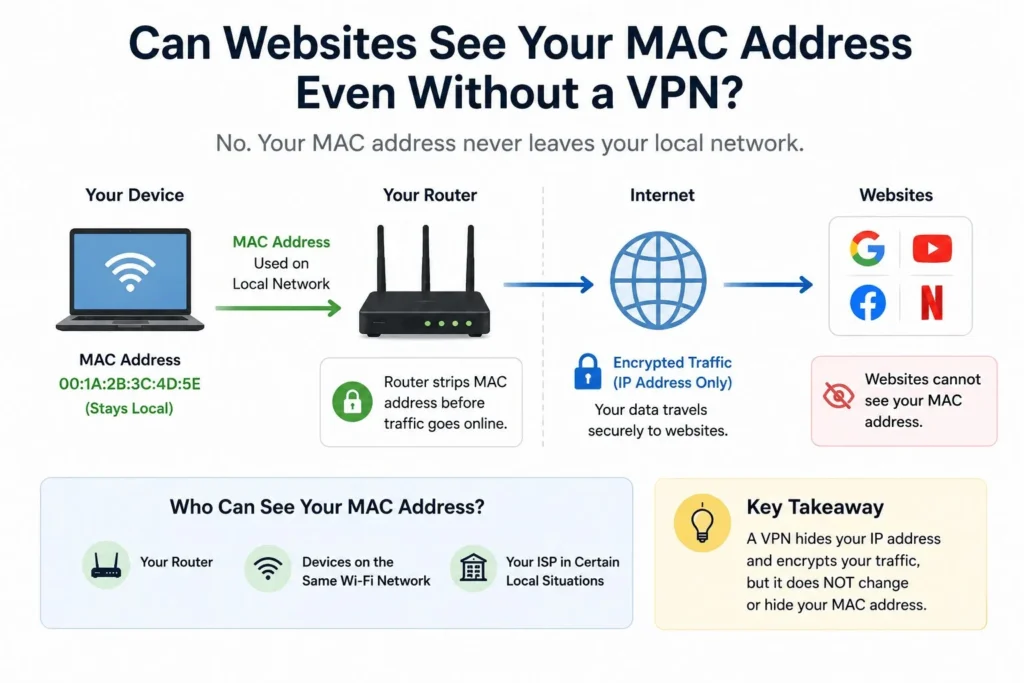
No. Websites cannot see your MAC address whether you use a VPN or not.
This is one of the most common privacy myths online.
Your MAC address gets stripped away by your router before internet traffic reaches websites. That means sites like Google, YouTube, Facebook, or Netflix never receive your MAC address.
Who can potentially see your MAC address?
- Your home router
- Devices connected to the same Wi Fi network
- Your ISP in certain local network situations
If you’re worried about websites tracking your device through MAC address data, that is actually not possible because your MAC never leaves your local network.
This is also why the answer to can vpn hide mac address is technically no. A VPN does not need to hide your MAC because websites cannot access it in the first place.
How to Actually Change Your MAC Address (If You Need To)
If your goal is local network privacy, you do have options. Instead of relying on a VPN, you can use MAC randomization or mac spoofing.
Method 1: Built in MAC Randomization (iPhone & Android)
Most modern smartphones already support MAC address randomization.
iPhone
- Open Settings
- Tap Wi Fi
- Tap your connected network
- Enable “Private Wi Fi Address”
Android
- Open Settings
- Go to Network & Internet
- Tap Wi Fi
- Open Advanced settings
- Enable “Randomize MAC”
This is the easiest option for public Wi Fi privacy and requires no technical knowledge.
Method 2: Change MAC Address on Windows
If you want more control, Windows lets you manually modify your MAC address.
- Open Device Manager
- Expand Network Adapters
- Right click your adapter
- Select Properties
- Open the Advanced tab
- Choose Network Address
- Enter a new MAC address value
On many systems, this change resets after reboot.
Method 3: MAC Spoofing Software
Advanced users often use mac spoofing tools like Technitium MAC Address Changer.
These tools let you:
- Create randomized MAC addresses
- Apply persistent changes
- Improve privacy on shared networks
Mac spoofing is legal in the United States for personal privacy and security purposes.
I personally tested MAC randomization on both Windows and iPhone during research for this guide. Even after connecting through multiple VPN servers, the MAC address stayed the same unless manually changed.
Should You Use a VPN Even If It Doesn’t Change Your MAC?
Absolutely.
Even though a VPN does not change your MAC address, it still provides major privacy benefits.
A VPN protects your real IP address, encrypts your internet activity, and helps secure your data on public Wi Fi networks. This matters especially in the United States, where ISPs can collect browsing data and unsecured networks remain common.
A VPN can also help with:
- Safer public Wi Fi usage
- Streaming geo restricted content
- Preventing ISP tracking
- Protecting traffic from local hackers
That said, a VPN is not complete anonymity. Your browser fingerprints, accounts, and online behavior can still reveal information.
Recommended VPN for US Users: If you want to protect your IP address and browsing activity, NordVPN is one of the best VPN USA options for speed, privacy, and public Wi Fi security.
Suggested Internal Links:
- Best VPN for USA
- VPN for Public Wi Fi
- Is a VPN Worth It?
Frequently Asked Questions
Does a VPN change my MAC address?
No. A VPN changes your public IP address and encrypts your internet traffic, but it cannot change your MAC address. Your MAC address operates at the hardware level on your local network and never travels to the internet.
Can websites see my MAC address?
No. Websites cannot see your MAC address whether you use a VPN or not. Your MAC address is stripped by your router and never sent beyond your local network.
What is the difference between a MAC address and an IP address?
A MAC address is a permanent hardware identifier assigned by the device manufacturer, used only within local networks. An IP address is assigned by your router or ISP, used across the internet, and can be changed or masked by a VPN.
How do I change my MAC address for privacy?
You can use built in MAC randomization on iPhone or Android, change it manually in Windows Device Manager, or use MAC spoofing software like Technitium MAC Address Changer.
The Bottom Line
A VPN does not change your MAC address, and for most users, that is completely fine because websites cannot see your MAC address anyway.
If your goal is internet privacy, a VPN is still one of the best tools for hiding your IP address and encrypting your traffic. If you want extra privacy on local Wi Fi networks, use MAC randomization or mac spoofing alongside your VPN.
Ready to protect your real IP address online? We recommend NordVPN for fast speeds, strong encryption, and reliable privacy protection for US users.