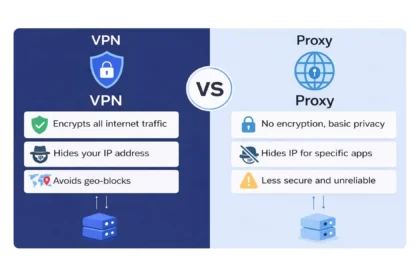

Free public WiFi is everywhere. You connect at airports, coffee shops, hotels, and even shopping malls without thinking twice. It is convenient, fast, and often necessary for work or travel. But many users never stop to ask an important question: Is it safe to use a VPN on public WiFi?
Public networks are often unsecured, which means your data can potentially be exposed to cybercriminals. When you browse, log into accounts, or check your bank balance on public WiFi, your information may travel across the network without strong protection.
Using a VPN on public WiFi can significantly reduce these risks by encrypting your internet connection and hiding sensitive data from attackers on the same network. However, a VPN is not a magic shield against every online threat. In this guide, you will learn exactly how public WiFi risks work, how a VPN protects you, and whether it is enough to keep your information safe.
Why Public WiFi Networks Are Risky
Public WiFi security risks are more common than most people realize. Many public hotspots operate on unsecured networks, which means data transmitted over them may not be fully encrypted.
Hackers on public WiFi often look for easy targets. They can use techniques such as packet sniffing to capture unencrypted data moving across the network. This may include login credentials, email content, or browsing activity if proper security measures are not in place.
Another major threat is the fake hotspot, sometimes called an evil twin attack. In this scenario, a cybercriminal creates a rogue hotspot that looks like a legitimate airport WiFi or coffee shop WiFi network. Once users connect, the attacker can monitor or manipulate their traffic.
Because public networks are shared environments, you never truly know who else is connected. Without protection, sensitive information may be vulnerable to interception, which increases the risk of identity theft or financial fraud.
What Can Hackers See on Public WiFi?
If you are wondering is public WiFi safe without extra protection, the honest answer is no. On an unsecured network, attackers may be able to view or capture certain types of data that travel between your device and the internet.
Hackers on public WiFi can potentially see:
- Login usernames and passwords on non secure websites
- Email messages that are not encrypted
- Browsing activity on HTTP pages
- Your IP address and approximate location
- Payment details entered on unsafe pages
Through data interception techniques, criminals can monitor traffic flowing across the same network. If a website does not use proper encryption, the transmitted information may be exposed in readable form.
Even when websites use HTTPS, attackers may still attempt session hijacking or redirect users to fake login pages. This is why relying only on the network itself is risky. A secure public WiFi connection requires additional protection beyond simply connecting to the hotspot.
How a VPN Protects You on Public WiFi
At this point, you might be thinking, does VPN protect on public WiFi in a real and practical way, or is it just marketing language? The answer becomes clearer when you understand what actually happens after you turn it on.
Here is how a VPN on public WiFi protects you step by step:
- Encrypted Tunnel: Your data is locked before it travels across the network. When you activate a VPN on public WiFi, it builds a secure encrypted tunnel between your device and a private server. This means your internet traffic is protected before it moves through the shared hotspot.
- Data Encryption: Your readable information becomes unreadable to outsiders. Encryption converts your readable information into scrambled code. Even if hackers on public WiFi attempt packet sniffing, the data they capture appears as random characters instead of passwords or personal details.
- Real Life Protection: Sensitive activities become safer on shared networks. Imagine you are at an airport and quickly checking your bank account. Without protection, your data moves across the same network used by dozens of strangers. With a VPN on public WiFi, your sensitive information is encrypted before it leaves your device, reducing the risk of data interception.
- IP Address Masking: Your real location stays private. A VPN replaces your real IP address with the IP address of the VPN server. This prevents others on the network from easily identifying your true location or tracking your device.
- Reduced Public WiFi Security Risks: Overall exposure to common attacks becomes lower. By combining encryption and IP masking, a VPN turns an insecure hotspot into a more secure public WiFi connection. While it does not eliminate every possible threat, it significantly lowers your exposure to common attacks.
Is It 100% Safe to Use a VPN on Public WiFi?
Many people assume that once they turn on a VPN, they are completely protected. It is important to understand the realistic answer to the question: Is It Safe to Use a VPN on Public WiFi in every situation? The honest answer is that a VPN greatly improves security, but it does not guarantee total protection.
Here is what a VPN does protect you from:
- Local Network Spying A VPN encrypts your data, which prevents hackers on public WiFi from easily reading your traffic through packet sniffing or basic interception tools.
- Data Interception Because your information is encrypted before leaving your device, attackers on the same unsecured network cannot easily capture passwords or banking details in readable form.
- IP Address Exposure A VPN hides your real IP address, reducing the chance that someone on the same network can identify or track your device.
Now here is what a VPN does not fully protect you from:
- Phishing Websites If you enter your credentials on a fake website, a VPN cannot stop you from submitting that information.
- Malware Downloads If you download infected files or click malicious links, the VPN encryption does not automatically block those threats.
- Weak Passwords Using simple or reused passwords still puts your accounts at risk, even when using a VPN on public WiFi.
To create a truly secure public WiFi connection, you must combine a VPN with safe browsing habits, strong passwords, and awareness of suspicious links. A VPN is a powerful layer of protection, but smart behavior is equally important.
VPN vs No VPN on Public WiFi
To clearly understand the difference, let us compare what happens when you use public WiFi with and without a VPN.
| Security Factor | Without VPN | With VPN |
|---|---|---|
| Data Encryption | No encryption on unsecured networks | Strong encryption protects your traffic |
| Visibility to Hackers on Public WiFi | High risk of exposure | Significantly reduced visibility |
| IP Address Privacy | Real IP address exposed | Real IP address hidden |
| Risk of Data Interception | High on unsecured network | Much lower due to encryption |
| Overall Public WiFi Security Risks | High | Reduced but not eliminated |
When you connect without protection, your data may travel openly across the shared network. Anyone using basic monitoring tools on the same hotspot could attempt to inspect that traffic.
When you use a VPN on public WiFi, your information is encrypted before it leaves your device. This does not make you invisible to every online threat, but it dramatically lowers the most common risks found on public networks.
When You Should Always Use a VPN on Public WiFi
While using a VPN on public WiFi is generally recommended, there are certain situations where it becomes especially important. In these cases, skipping protection can expose sensitive information to unnecessary risk.
You should always activate a VPN on public WiFi in the following situations:
- Online Banking Use a VPN when accessing banking apps or transferring money to prevent data interception on unsecured networks.
- Shopping and Payments Activate a VPN before entering credit card details on airport WiFi or coffee shop WiFi.
- Work Emails or Company Systems Always use a VPN on public WiFi when accessing business emails or confidential company dashboards.
- Social Media Accounts Turn on a VPN to reduce the risk of session hijacking on shared networks.
- Traveling Internationally Use a VPN to maintain a secure public WiFi connection when connecting to hotel or airport networks abroad.
In short, if you are doing anything that involves personal, financial, or work related information, turning on a VPN on public WiFi should be a basic habit rather than an optional step.
Extra Safety Tips for Public WiFi Users
- Use HTTPS Websites Only enter sensitive information on websites that show HTTPS in the address bar.
- Disable Auto Connect Turn off automatic WiFi connection to avoid joining rogue hotspots.
- Enable Two Factor Authentication Add an extra security layer to your accounts even if passwords are exposed.
- Keep Your Device Updated Install software and security updates regularly to fix vulnerabilities.
- Turn Off File Sharing Disable file sharing settings when connected to public networks.
- Log Out After Use Always log out of important accounts when using shared or public devices.
Free vs Paid VPN for Public WiFi
Not all VPN services offer the same level of protection. If you plan to use a VPN on public WiFi regularly, understanding the difference between free and paid options helps you make a smarter decision.
Free VPN Services
Best for light browsing only.
Pros:
- Basic encryption
- No upfront cost
Limitations:
- Data limits and slower speeds
- Fewer server locations
- Limited security features
- Possible activity logging or ads
Paid VPN Services
Better for regular or sensitive usage.
Benefits:
- Stronger encryption standards
- Faster and more stable speeds
- More server locations
- Extra features like kill switch and DNS leak protection
- Usually stricter no log policies
If you frequently use public WiFi for banking, work emails, or online payments, a paid VPN is generally the safer long term choice. Free VPNs may work for casual browsing, but they often lack advanced protection features needed for a truly secure public WiFi connection.
Is It Safe to Use a VPN on Public WiFi?
That said, no security tool offers total protection. A VPN protects your data on unsecured networks, but you still need strong passwords, two-factor authentication, updated devices, and awareness of phishing scams. True online safety always comes from combining technology with smart behavior.
Our Approach to Practical Cybersecurity Guidance
At privacyinspect, we focus on practical cybersecurity guidance that is easy to understand and apply. Our goal is not just to explain whether it is safe to use a VPN on public WiFi, but to help you build safer online habits with clear, research-based advice.
By following the strategies shared in this guide, you can confidently use public networks while significantly lowering your security risks.
Frequently Asked Questions (FAQs)
1. Is it safe to use a VPN on public WiFi?
Yes, using a VPN on public WiFi makes your connection much safer because it encrypts your internet traffic and reduces the risk of data interception. While it does not stop every online threat, it significantly improves security on shared networks.
2. Is public WiFi safe without a VPN?
No, public WiFi is generally not safe without additional protection. On unsecured networks, hackers may attempt to monitor traffic, capture login credentials, or intercept sensitive information.
3. Can hackers still track you if you use a VPN?
A VPN hides your real IP address and encrypts your data, which makes tracking much harder. However, websites can still track activity through cookies or if you log into personal accounts.
4. Does a VPN protect against identity theft on public WiFi?
A VPN reduces the risk of identity theft by preventing attackers from easily capturing personal information on unsecured networks. However, it cannot protect you from phishing scams or fake websites.
5. Is using a VPN legal?
Yes, using a VPN is legal in most countries. Many individuals and businesses use VPN services to improve privacy and secure their internet connections. However, always check local regulations in your region.