
Many people use the terms VPN and proxy as if they mean the same thing. In reality, they are very different tools, designed for different levels of privacy and security. If you are trying to protect your personal data, access restricted content, or secure your business network, understanding the difference between a VPN and a proxy is extremely important.
In the USA, concerns around online privacy, data tracking, cybercrime, and secure remote work have increased significantly. Whether you are an individual using public Wi‑Fi at airports and cafes, or a business managing remote employees, choosing between a VPN or proxy can directly impact your online safety.
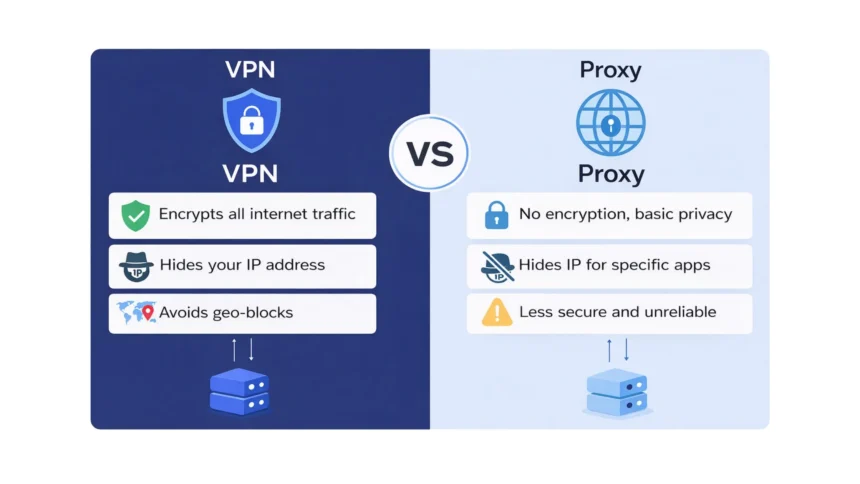
Both VPNs and proxies can hide your IP address, but that is where the similarity often ends. A VPN focuses on encryption and full privacy, while a proxy mainly acts as a middleman for your internet traffic.
This leads to a very common question: VPN vs proxy – which is safer? In this detailed guide, we will explain what a VPN is, what a proxy server is, the key differences between them, and which option is better for security, privacy, streaming, and business use. By the end of this article, you will clearly know whether a VPN or proxy is the right choice for you.
What Is a VPN?
A VPN, short for Virtual Private Network, is a security tool that protects your internet connection by creating a secure and encrypted tunnel between your device and the internet. When you use a VPN, all your online traffic is routed through a VPN server before it reaches websites or online services.
In simple terms, a VPN hides your real IP address and replaces it with the IP address of the VPN server. This makes it difficult for websites, hackers, advertisers, or even your internet service provider (ISP) to track your real location or monitor your online activity. This is one of the main reasons people search for answers to VPN vs proxy and want to know which option offers better protection.
One of the biggest advantages of a VPN is encryption. Encryption means your data is scrambled into unreadable code while it travels across the internet. Even if someone tries to intercept your data on public Wi‑Fi, they will not be able to read it. This makes VPNs especially important for online banking, shopping, work emails, and accessing sensitive business systems.
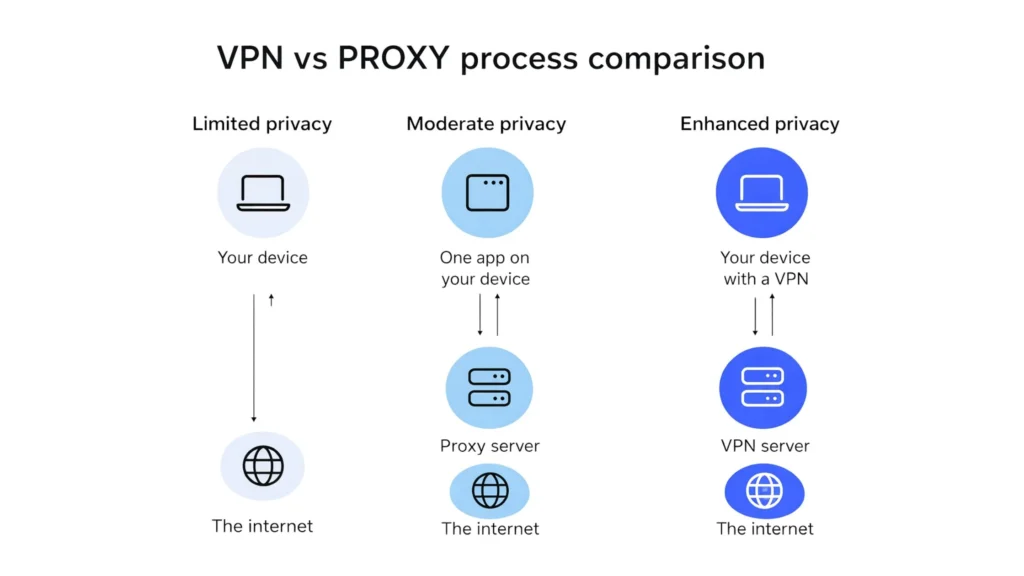
A VPN works at the device level, not just the browser. This means once the VPN is connected, it protects all internet activity on your device, including browsers, apps, email clients, and cloud software. This is a major difference when comparing a proxy vs VPN, because most proxies only work for specific apps or browsers.
VPNs are widely used by individuals and businesses in the USA. For personal users, VPNs help protect privacy, secure public Wi‑Fi connections, and access geo‑restricted content. For businesses, VPNs allow employees to safely access company networks while working remotely, without exposing sensitive data.
In short, a VPN is designed for security, privacy, and full internet protection, which is why many experts consider it the safer option in the VPN vs proxy comparison.
What Is a Proxy Server?
A proxy server is an intermediary that sits between your device and the internet. When you use a proxy, your internet request first goes to the proxy server, and then the proxy forwards that request to the website on your behalf. As a result, the website sees the proxy server’s IP address instead of your real IP address.
In simple words, a proxy helps hide your IP address from the websites you visit. This is why many people confuse proxies with VPNs and search for terms like proxy vs VPN difference or VPN or proxy which is better. However, the way a proxy works is very different from a VPN.
One important thing to understand is that most proxies do not encrypt your internet traffic. This means that while your IP address may be hidden from a website, your data is still visible to your internet service provider (ISP), network administrators, or hackers on unsecured networks. This lack of encryption is a key reason why proxies are considered less safe in the VPN vs proxy debate.
Another major difference is that proxies usually work at the application or browser level, not the device level. For example, you may configure a proxy only in your web browser. Other apps on your device, such as email clients, messaging apps, or cloud tools, will not be protected by the proxy. This is a critical limitation when comparing a proxy vs VPN for overall security.
Proxies are commonly used for specific tasks such as accessing region-restricted websites, basic content filtering, web scraping, or managing internet usage in schools and offices. In some business environments, proxy servers are used to block certain websites or monitor employee browsing activity. However, proxies are not designed to provide full privacy or strong security.
In summary, a proxy server mainly focuses on IP masking and traffic routing, not encryption or complete protection. This makes proxies useful for limited, low-risk use cases, but less suitable when security and privacy are a priority in the VPN vs proxy comparison.
VPN vs Proxy – Key Differences
To clearly understand the VPN vs proxy debate, it is best to compare them side by side. While both tools can hide your IP address, their purpose, level of security, and use cases are very different. The table below highlights the most important differences between a VPN and a proxy server in a simple and user-friendly way.
| Feature | VPN (Virtual Private Network) | Proxy Server |
| Encryption | Yes. A VPN encrypts all your internet data, making it unreadable to hackers, ISPs, and third parties. | No. Most proxies do not encrypt data, which means your traffic can be seen or intercepted. |
| Security Level | High. VPNs are built for privacy and security, especially on public Wi‑Fi networks. | Low. Proxies mainly hide IP addresses but do not protect data. |
| IP Address Masking | Yes. Your real IP is hidden and replaced with the VPN server’s IP. | Yes. Websites see the proxy IP instead of your real IP. |
| Scope of Protection | Device‑wide. All apps, browsers, and software are protected once the VPN is connected. | App‑specific. Only the configured browser or app uses the proxy. |
| Privacy from ISP | Yes. ISPs cannot see your browsing activity due to encryption. | No. ISPs can still monitor your internet activity. |
| Public Wi‑Fi Safety | Very safe. Encryption protects your data on open and unsecured networks. | Not safe. Data can be exposed on public Wi‑Fi. |
| Streaming & Geo‑Blocking | Works well. VPNs are effective for accessing geo‑restricted streaming services. | Limited. Many streaming platforms block proxy servers. |
| Speed Impact | Slight encryption overhead, but premium VPNs offer fast and stable speeds. | Can be fast, but free proxies are often slow and unreliable. |
| Business Use | Ideal for remote work, secure access to company systems, and data protection. | Used mainly for content filtering, monitoring, or web scraping. |
| Cost | Usually paid, with monthly or yearly plans and free trials. | Often free, but free proxies carry higher security risks. |
From a safety and privacy perspective, this comparison clearly shows why VPNs are generally the preferred choice. When people ask “VPN or proxy which is better?”, the answer depends on their goal, but for security, privacy, and everyday internet use, a VPN is the stronger and safer option.
This proxy vs VPN difference becomes even more important when handling sensitive data, using public Wi‑Fi, or managing business operations, which we will explore further in the next sections.
Which Is Safer: VPN or Proxy?
When it comes to online safety, the answer to VPN vs proxy – which is safer is clear for most users. A VPN is significantly safer than a proxy, especially for everyday internet use.
Here’s why a VPN is safer than a proxy:
- Strong encryption: A VPN encrypts all your internet traffic from your device to the VPN server. This protects your data from hackers, cybercriminals, and spying attempts.
- Protection on public Wi‑Fi: VPN encryption keeps your information safe on unsecured networks like airports, cafes, and hotels.
- Privacy from ISP: When using a VPN, your internet service provider (ISP) cannot see the websites you visit or the data you send.
- Full device coverage: A VPN secures all apps and browsers on your device, not just one application.
- Trusted providers: Reputable VPN services follow strict privacy and no‑logs policies, meaning they do not store your browsing activity.
Why proxies are less safe:
- No encryption: Most proxy servers do not encrypt data, making your traffic easy to monitor or intercept.
- Risk on public networks: Using a proxy on public Wi‑Fi can expose sensitive information.
- Unknown operators: Many free proxies are run by unknown parties and may track activity, inject ads, or steal data.
- Limited protection: Proxies usually work only at the browser or app level, leaving the rest of your device unprotected.
For businesses:
- VPNs are built to protect company data, support secure remote access, and prevent data leaks.
- Proxies should never replace VPNs in business environments where security and compliance matter.
Note
- If your goal is real online safety, privacy, and data protection, a VPN is the clear winner in the VPN vs proxy comparison.
- Proxies may work for simple, low‑risk tasks, but they should not be relied on for security
VPN vs Proxy for Privacy and Security
Privacy and security are the main reasons why users compare a VPN vs proxy. While both tools can hide your IP address, the level of privacy and protection they offer is very different.
How VPNs protect privacy and security:
- End-to-end encryption: A VPN encrypts all your internet traffic, making it unreadable to hackers, ISPs, advertisers, and third parties.
- Hides online activity: With a VPN, your ISP cannot see which websites you visit or what data you share online.
- Protection across all apps: VPNs secure your entire device, including browsers, email apps, messaging tools, and business software.
- Safe remote work: VPNs allow employees to securely access company systems and files while working from home or traveling.
- No-logs policies: Trusted VPN providers follow strict no-logs policies, which means your browsing activity is not stored or tracked.
How proxies handle privacy and security:
- IP masking only: Proxies hide your IP address from websites but do not protect your data.
- No encryption: Most proxies send data in plain text, which can be easily intercepted on unsecured networks.
- ISP visibility: Your internet service provider can still see your online activity when using a proxy.
- Limited coverage: Proxies usually work only in a browser or specific app, leaving other internet activity exposed.
- Higher risk with free proxies: Many free proxy servers may log activity, inject ads, or misuse user data.
Note
- If privacy and security are your top priorities, a VPN is the better and safer choice in the proxy vs VPN comparison.
- Proxies are suitable only for basic tasks where privacy and data protection are not critical.
VPN vs Proxy for Streaming and Content Access
Many users compare a VPN vs proxy mainly for streaming movies, TV shows, and accessing geo‑restricted websites. While both tools can help change your virtual location, they do not perform equally when it comes to streaming and content access.
Using a VPN for streaming:
- Better access to geo‑restricted content: VPNs are widely used to access region‑locked streaming platforms by assigning you an IP address from another country.
- Works across apps and devices: A VPN protects your entire device, so it works with streaming apps, smart TVs, gaming consoles, and browsers.
- Stable and reliable connections: Premium VPNs invest in high‑speed servers optimized for streaming, reducing buffering and connection drops.
- Privacy while streaming: Your streaming activity stays private from ISPs, which is important in regions where ISPs monitor or throttle streaming traffic.
- Less likely to be blocked: Many VPN providers regularly update their IP addresses to bypass streaming platform restrictions.
Using a proxy for streaming:
- Limited to browser use: Most proxies work only in browsers and may not support streaming apps.
- Easily detected and blocked: Many streaming platforms actively block known proxy IP addresses.
- No encryption: Streaming data is not encrypted, which can expose your activity on public networks.
- Unstable speeds: Free proxies are often slow, overcrowded, and unreliable for video streaming.
- Not suitable for HD or 4K streaming: Frequent buffering and poor performance are common.
Key takeaway for streaming:
- If streaming is your main goal, a VPN is the better option in the proxy vs VPN comparison.
- Proxies may work for accessing basic websites, but they are not reliable for streaming platforms or long‑term content access.
VPN vs Proxy for Business Use
For businesses in the USA, choosing between a VPN vs proxy is not just about convenience, it is about data security, compliance, and operational safety. While both tools are used in corporate environments, they serve very different purposes. The table below clearly explains the proxy vs VPN difference for business use.
| Business Requirement | VPN (Virtual Private Network) | Proxy Server |
| Data Security | Encrypts all business data in transit, protecting sensitive information from cyber threats. | Does not encrypt data, leaving business traffic vulnerable. |
| Remote Work Support | Ideal for secure remote access to company systems, internal tools, and databases. | Not suitable for secure remote access. |
| Employee Privacy | Protects employee activity from ISPs and unsecured networks while working remotely. | Employee activity can still be monitored by ISPs or network attackers. |
| Device Coverage | Secures all devices and applications used by employees. | Limited to specific browsers or applications. |
| Compliance & Regulations | Helps meet security and data protection requirements for many industries. | Does not meet most compliance or security standards. |
| Network Control | Focuses on secure access rather than monitoring. | Commonly used to monitor, filter, or restrict employee internet usage. |
| Scalability | Easily scalable for growing teams and remote workforces. | Limited scalability for security-focused needs. |
| Use Case Fit | Best for IT security, remote teams, cloud access, and protecting company data. | Best for content filtering, web monitoring, or basic traffic management. |
Business takeaway
- If a business needs strong security, remote access, and data protection, a VPN is the correct choice in the VPN vs proxy comparison.
- Proxies may still be useful for monitoring or filtering web traffic, but they should never replace VPNs for protecting business data.
When to Use a VPN vs When to Use a Proxy
Even after understanding the VPN vs proxy difference, many users still ask when each tool should be used. The answer depends on your specific needs, risk level, and use case.
Use a VPN when:
- You want strong privacy and security for everyday internet use.
- You frequently connect to public Wi-Fi networks at airports, cafes, or hotels.
- You access sensitive information such as online banking, work emails, or business systems.
- You want to stream geo-restricted content reliably.
- You work remotely and need secure access to company tools and files.
Use a proxy when:
- You need to hide your IP address for a simple, low-risk task.
- You want quick access to a blocked website without sharing sensitive data.
- You are performing tasks like basic web scraping or content testing.
- Security and encryption are not a priority.
Quick guidance:
- For privacy, security, and long-term use, a VPN is the better option.
- For limited, short-term tasks, a proxy may be sufficient.
Pros and Cons of VPNs and Proxies
To summarize the proxy vs VPN comparison, here are the main advantages and disadvantages of each.
VPN Pros:
- Strong encryption and high security
- Protects all apps and devices
- Keeps browsing activity private from ISPs
- Ideal for streaming, remote work, and public Wi-Fi
- Trusted providers with no-logs policies
VPN Cons:
- Usually requires a paid subscription
- Slight speed impact due to encryption (minimal with premium VPNs)
Proxy Pros:
- Easy to use for basic tasks
- Often free or low cost
- Useful for IP masking and simple access needs
Proxy Cons:
- No encryption or data protection
- Limited to browser or app level
- Higher risk with free proxy services
- Not suitable for sensitive or business use
VPN or Proxy – Which Should You Choose?
When comparing VPN vs proxy, the choice becomes clear once you understand your needs. While both tools can hide your IP address, they are designed for very different purposes.
A VPN offers encryption, full-device protection, and strong privacy. It is the best choice for individuals who care about online safety, as well as businesses that need secure remote access and data protection. Proxies, on the other hand, are suitable only for simple, low-risk tasks where security is not a concern.
Final recommendation:
- Choose a VPN if you want real privacy, security, and peace of mind online.
- Use a proxy only for limited tasks where encryption and privacy are not required.
If you are looking to improve your online security, protect your data, or access content safely, a reliable VPN is the smartest long-term solution.
Frequently Asked Questions (FAQs)
1. Is a VPN better than a proxy?
Yes. In most cases, a VPN is better than a proxy because it encrypts your data and protects your privacy.
2. Can a proxy replace a VPN?
No. A proxy cannot replace a VPN when it comes to security, privacy, or remote access.
3. Is it safe to use free proxy servers?
Free proxies are risky because they often lack encryption and may track or misuse user data.
4. Can I use a VPN and a proxy together?
It is possible, but not recommended due to speed issues and added complexity.
5. Which is better for businesses: VPN or proxy?
For businesses, a VPN is the better choice because it provides secure access and protects sensitive company data.